Who Should Use Planable
Five-person marketing agencies juggling eight client accounts know this pain: you post a draft, the client emails feedback, their colleague adds notes via WhatsApp, and the final post still goes live with the wrong logo. Planable exists to kill that workflow.
Manage content for external clients who need sign-off before anything publishes? This tool saves you more time in the first month than it costs all year.
In-house teams with cautious executives also fit. A retail brand with two marketers and a CEO who demands to see everything before it goes live gets real value from structured approval flows. No more "did you check with Sarah?" conversations.
Running solo with no approvals needed? Skip this. Planable is built around collaboration. Without that, you're paying for a prettier Buffer that costs more.
What It Actually Does
Planable shows you exactly how your post will look on Instagram, LinkedIn, or wherever it's going while you're still drafting. No guessing whether that caption gets cut off.
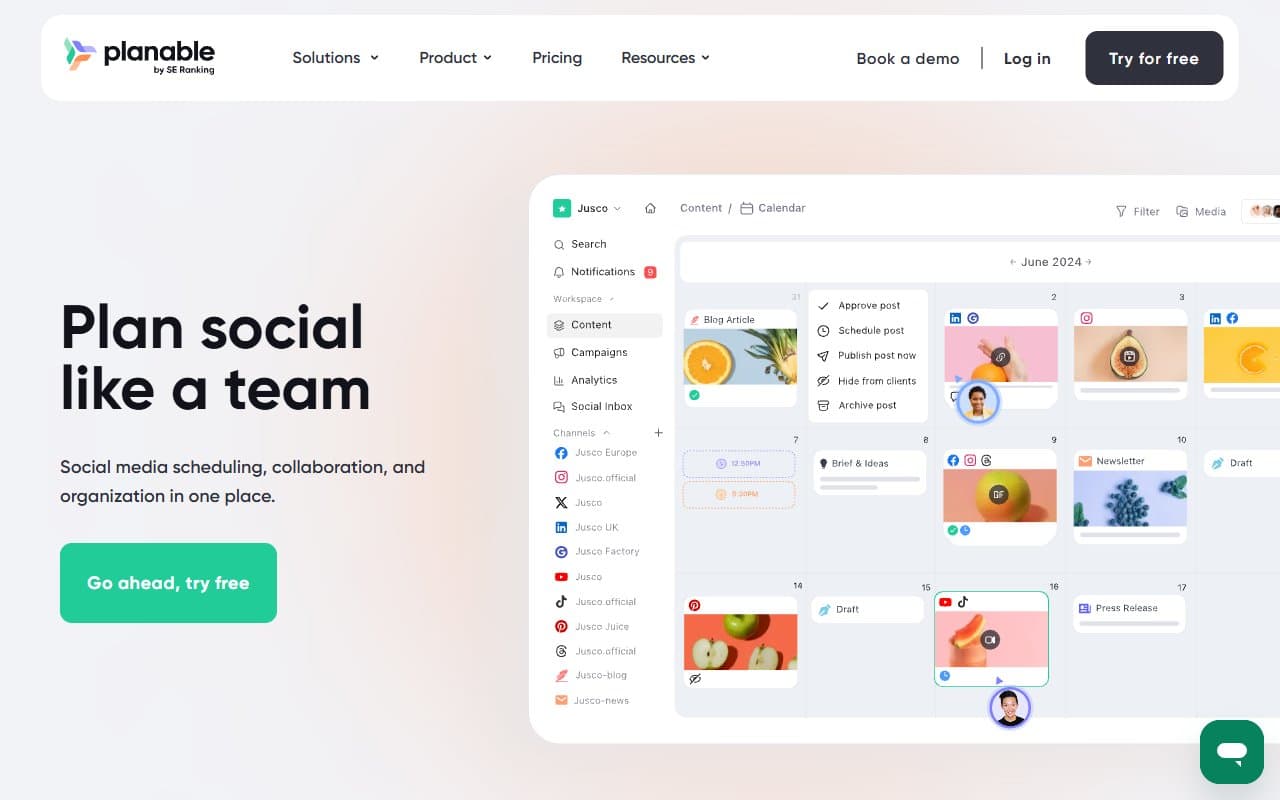
Team members and clients comment directly on the draft — not in separate documents, not over email, right there on the post. Stakeholders approve with one click. Nothing gets scheduled until the right people sign off. You can set different approval rules for different clients, which matters when one client is relaxed and another requires three rounds of review.
The content calendar shows what's going out across all accounts in one view. Scheduling happens in the same platform.
Pricing
Free plan: One workspace, 50 posts. Useful for testing but the post limit disappears fast once you're actively using it. Treat this as a trial.
Starter at $11/user/month: Buy this one. Unlimited posts and workspaces, full approval workflow. This tier makes sense for small agencies or two-person teams.
Pro at $22/user/month: Adds custom approval workflows and analytics. Most teams under 20 people won't need the extra features. Upgrade only if you're billing clients and need audit trails.
Enterprise: Custom pricing. Ignore unless you're a large agency with compliance requirements.
What Works Well
The visual preview is accurate. Most scheduling tools show you a rough approximation. Planable shows you the actual post. You'll catch formatting problems and awkward line breaks before they go live.
Client approvals cut back-and-forth significantly. Clients get a clean view of their content without needing a Planable login. They comment, request changes, or approve in one place. The feedback loop that used to take three days now takes hours.
The multi-brand calendar is well-designed. Switching between client accounts is fast, the calendar view is clean, and you can see everything across workspaces without losing your mind. Agencies managing five or more brands feel this immediately.
What Does Not Work
Analytics are weak until Pro tier. Want to report back to clients on post performance? Planable's native analytics won't cut it on Starter — and even Pro's analytics are basic compared to Databox or Agency Analytics. You'll still need a separate reporting solution.
Per-user pricing hurts as teams grow. Eight people on Pro costs $176/month before adding external clients. Sendible's seat structure scales more generously. For fast-growing agencies, the pricing becomes a problem.
How It Compares
Hootsuite is overcomplicated for small teams and priced for enterprise ambitions most small businesses don't share. Choose Planable if approvals and client collaboration are your priority. Choose Hootsuite only if social listening or paid social management are central to your workflow.
Buffer is simpler and cheaper, built for solo operators who just need to schedule posts efficiently. No meaningful approval workflow. If you never need client sign-off, Buffer is cleaner and more affordable. If you do, Buffer will frustrate you within a week.
Sendible handles reporting better natively and sits closer to Planable's territory. For agencies where client reporting is a major time sink, Sendible may be stronger. For teams where approvals are the bottleneck, Planable's interface is cleaner.
The Verdict
Run a marketing agency or manage social content where someone else needs to approve posts? Planable is one of the most practical tools in this category. The approval workflow alone justifies Starter for any team billing clients.
Solo operator scheduling your own content with no oversight? The pricing isn't built for you — Buffer or Metricool serve you better for less money.
Team growing past ten people with client reporting becoming a major deliverable? Look at Sendible before committing.
For collaborative social media management with clean client approvals, Planable delivers without requiring a training session to get started. It does one job exceptionally well and respects the fact that your clients won't download another app just to review a LinkedIn post.
Common Questions
Does Planable work for Instagram and LinkedIn?
Yes. Supports Instagram, LinkedIn, Facebook, Twitter/X, TikTok, YouTube, Google Business Profile, and Pinterest. Visual preview works across all platforms.
Can clients approve posts without creating an account?
Clients can be invited as guests and access their workspace without a full subscription. They see their content, leave feedback, and approve posts without understanding the broader platform. Most agencies find clients adapt within one content cycle.
Is the free plan actually useful?
It's a real trial. Fifty posts across one workspace gives you enough room to test the full approval workflow with an actual client. You'll hit the limit fast and face a decision to upgrade.
How does Planable handle multiple clients?
Each client gets its own workspace with separate calendar, approval settings, and team members. You can move between workspaces quickly. Permissions are kept separate so clients only see their own content.