Who Should Use Streak
A two-person recruiting firm that tracks candidates entirely through email is exactly who Streak was built for. You spend eight hours a day in Gmail — Streak just adds structure without changing your workflow. No more forwarding threads to yourself as reminders or keeping deal spreadsheets alongside your inbox.
A five-person marketing agency handling client projects will get real value from shared pipelines. Your account manager and project lead both see where each client stands without Monday morning Slack updates. That removes surprising friction from a small team's week.
Streak stops making sense when your sales process outgrows email. A 15-person SaaS company running outbound sequences and territory assignments will hit Streak's ceiling fast. This tool inherits Gmail's limitations without apology.
What It Actually Does
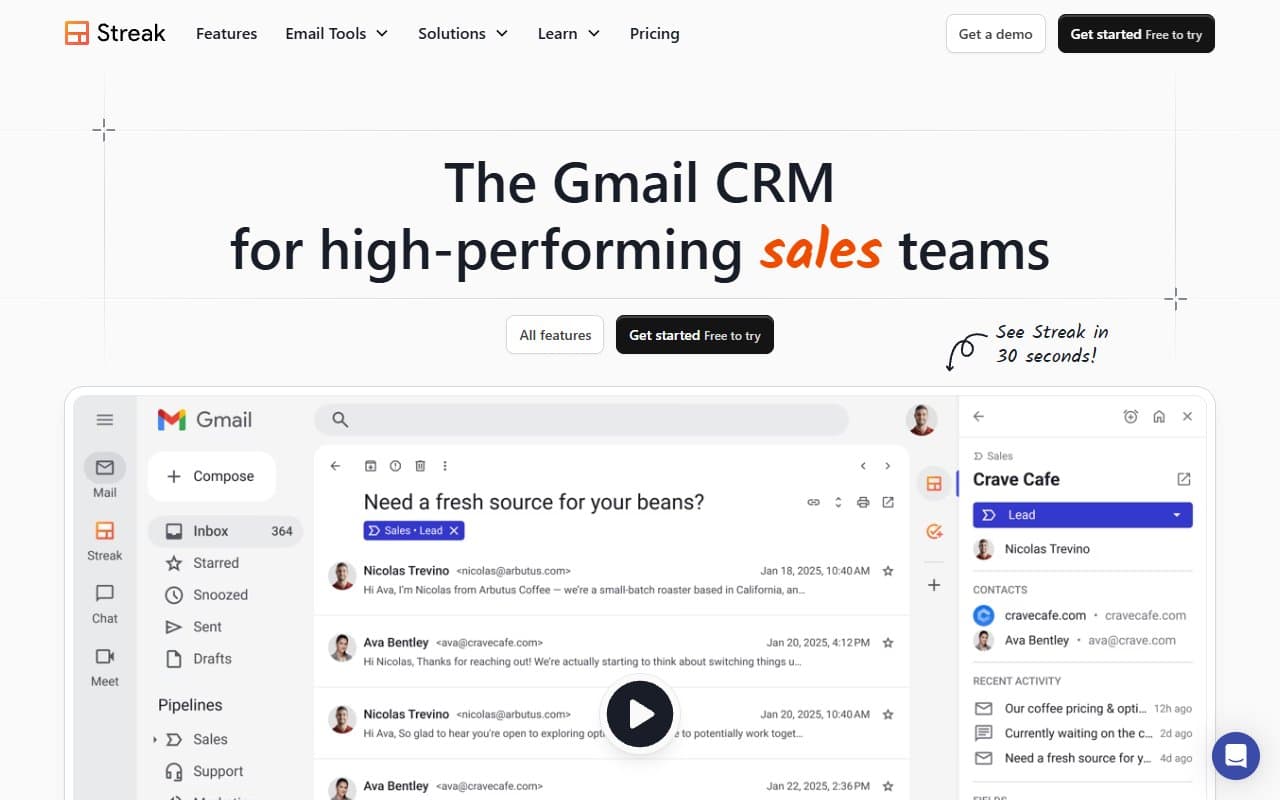
Streak turns your Gmail inbox into a CRM without making you leave Gmail. Open an email thread and a panel appears showing deal stage, contact details, notes, and custom fields. Move deals through your pipeline without touching a separate app.
The pipeline view works like a kanban board but lives inside Gmail as a tab. Drag a deal from "Proposal Sent" to "Negotiating" and it updates everywhere your team sees it. Email tracking shows when someone opened your message. Snippets insert pre-written templates with keyboard shortcuts so you stop retyping the same follow-up for the hundredth time.
Zapier integration connects to invoicing tools and project management software. The whole thing runs as a Chrome extension — install it and it just works.
Pricing
Free gets you one pipeline, basic email tracking, and snippets. For solopreneurs testing fit, it's a real free tier rather than a crippled demo. Skip this if you need shared pipelines.
Pro at $19/user/month is where Streak becomes useful for small teams. You get unlimited pipelines, shared pipelines, full email tracking history, and mail merge. Pick this tier for two to five person teams. The per-seat cost pays for itself in week one from time saved chasing deal status.
Enterprise at $59/user/month adds priority support, custom permissions, and data validation. Most small businesses don't need this tier. If you're considering it, you've probably outgrown Streak's capabilities and should look at a more serious CRM.
What Works Well
Zero onboarding friction. Most CRM migrations fail because nobody has time to rebuild everything in a new tool. Streak skips that problem — because it lives inside Gmail, your email history is already there when you install it. Freelancers can track deals within twenty minutes of setup.
Snippets save genuine time. The template library isn't a gimmick. For repetitive follow-ups, proposals, or onboarding emails, having pre-written responses in the compose window cuts response time significantly. Teams report clearing their follow-up queue in half the time.
Pipeline flexibility beyond sales. Streak works just as well for hiring, investor outreach, or client onboarding. Build the stages yourself. Small agencies can run "Content Production" and "New Business" pipelines side by side without paying for a second tool.
What Doesn't Work
Reporting is thin. Want to understand why deals stall, where your pipeline leaks, or your close rate by source? Streak will frustrate you. Analytics are basic enough that you'll export to spreadsheets anyway — which defeats much of the CRM's purpose for data-driven decisions.
Gmail dependency breaks teams. One team member on Outlook or using a mobile-first workflow breaks the shared pipeline experience. Streak has no standalone web app worth using. If Gmail isn't your whole team's home base, this tool creates gaps rather than closing them.
How It Compares
HubSpot CRM offers more power, better reporting, and scales further. But the free tier overwhelms solopreneurs, and small teams often spend more time managing HubSpot than selling. Choose Streak if simplicity and Gmail integration matter more than reporting depth.
Pipedrive delivers stronger sales pipeline management and much better analytics at a similar price. If your business runs on outbound sales with multiple reps, Pipedrive wins. Streak wins when your workflow is email-centric and you hate context switching.
The Verdict
If you're a freelancer or run a small agency where client communication happens in Gmail, Streak is the most sensible CRM decision you can make. It won't ask you to change how you work, won't take a week to set up, and the Pro tier pays for itself quickly at $19/user.
If you're building a structured sales team that needs forecasting, territory management, or detailed reporting, skip Streak entirely and start with Pipedrive or HubSpot CRM — you'll hit Streak's ceiling within six months.
For everyone else, the question isn't whether Streak is good enough. It's whether you can justify the complexity of anything else. A CRM you actually use beats a powerful one you ignore.
Common Questions
Does Streak work on mobile?
There's a Streak mobile app for Gmail on iOS and Android, but the experience is thinner than desktop. You can view pipelines and log notes, but the full functionality — snippets, tracking, pipeline editing — works best in Chrome on desktop.
Is Streak secure enough for client data?
Streak is SOC 2 Type II certified and operates within Google's infrastructure. For most small businesses handling standard client communications, that's sufficient. If your business is subject to HIPAA or strict financial regulations, verify compliance requirements with Streak directly.
Can I use Streak for something other than sales?
Absolutely. Recruiting pipelines, investor outreach, content calendars, and client onboarding workflows all map well onto Streak's structure. Many small teams use it for two or three different processes simultaneously.
What happens to my data if I cancel?
Streak lets you export pipeline data as CSV before cancelling, and your emails remain in Gmail regardless. You lose the CRM layer on top but keep your email history. Export everything before switching and the transition is manageable.