Who Should Use Salesflare
A five-person IT consultancy where the founder also sells. A twelve-person SaaS startup where the sales team spends more time updating the CRM than actually selling. A boutique recruitment agency where deals move slowly and follow-up timing makes or breaks deals. These businesses are exactly what Salesflare was built for.
If your sales process is relationship-driven, runs over weeks or months, and involves email threads, LinkedIn conversations, and calendar meetings — Salesflare maps directly onto that reality. It pulls in activity automatically rather than waiting for your team to remember to log it. For B2B businesses where a single deal justifies three months of relationship-building, that automation saves actual time.
Steer clear if you run an e-commerce store or sell directly to consumers. Salesflare has no tools for high-volume transactional sales, and nothing here will help you manage a Shopify funnel or a customer support queue.
What It Actually Does
Salesflare watches your inbox and calendar, then fills in the paperwork itself. Every email you send or receive from a contact gets automatically logged against their record. Meetings show up without you touching anything. It connects to LinkedIn so you can pull contact details directly from a profile without copying and pasting.
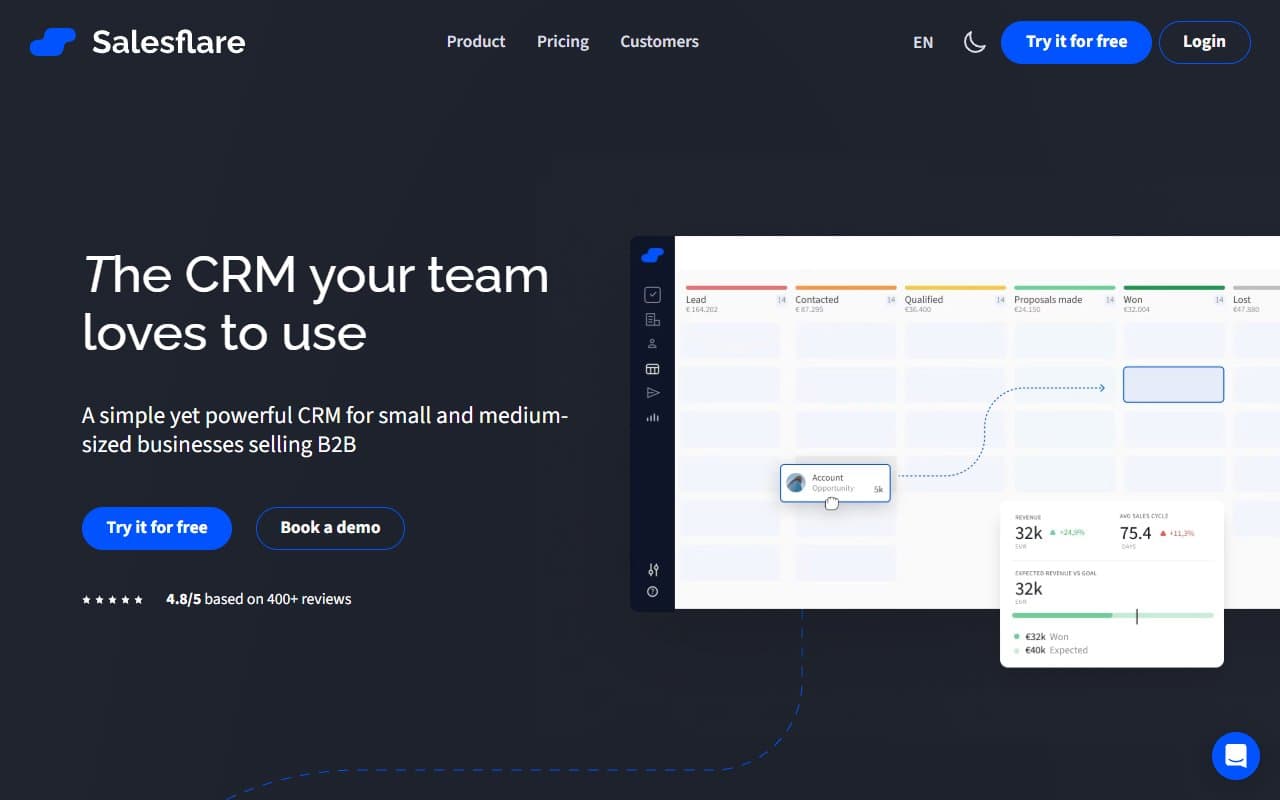
It tracks whether your emails have been opened, flags deals that have gone quiet, and nudges you with follow-up suggestions when a conversation has stalled. Your pipeline is a visual board — deals move from stage to stage, and the system highlights where things are getting stuck.
It is a focused sales tool for teams that work accounts over time. It will not run your marketing campaigns or manage customer support tickets. What it does, it does with less friction than almost anything else in this price range.
Pricing
Growth — $29/month per user. This covers the core product: auto-logging, email tracking, pipeline management, and LinkedIn integration. For most small businesses, this tier is enough. The value is real at this price, particularly if you are coming from a tool where your team ignores the CRM because updating it takes too long.
Pro — $49/month per user. Adds email sequences, permissions, and custom dashboards. If you have more than five or six salespeople and need to manage who sees what, Pro earns its keep. For a solo founder or a two-person team, you do not need it yet.
Enterprise — $99/month per user. Custom training, a dedicated account manager, and SSO. This tier is priced for companies that have outgrown the SMB bracket. Most readers should not be here.
Start on Growth. Move to Pro when you hire your third or fourth salesperson and the lack of permissions becomes an actual problem — not before.
What Works Well
The auto-logging actually works. Most CRMs claim to auto-log activity and then miss half of it. Salesflare connects to your Gmail or Outlook at a deeper level than most competitors, and in practice it captures email threads consistently. This alone saves most teams around two hours a week in manual data entry.
Follow-up suggestions that are actually useful. The system flags deals that have gone silent based on your own activity patterns, not a generic timer. When a deal you touched fourteen days ago surfaces with a prompt, it feels like a useful nudge rather than noise.
LinkedIn integration that works without a separate tool. The sidebar pulls contact and company data directly from LinkedIn profiles. For B2B salespeople who live on LinkedIn, this eliminates a genuinely annoying part of the prospecting workflow.
What Does Not Work
Reporting is pathetic at the Growth tier. The pipeline view is clean, but if you need to slice performance data by rep, by deal source, or by close rate over time, you hit walls immediately. Moving to Pro for custom dashboards fixes it, but that is an extra $20 per user per month for what should be standard.
No native phone or SMS tools. If your sales process involves outbound calls or text follow-ups, Salesflare does not cover it. You need a separate tool and a separate integration. For some businesses that is fine; for others, it creates exactly the kind of admin friction Salesflare exists to eliminate.
How It Compares
HubSpot CRM. HubSpot's free tier is tempting, but by the time you add the features that make it genuinely useful for sales, you pay more than Salesflare and manage a much more complex product. Choose HubSpot if you need marketing automation tightly coupled to your CRM. Choose Salesflare if you want to sell faster and stop fighting your software.
Pipedrive. Pipedrive and Salesflare compete at similar price points. Pipedrive has stronger reporting and a larger app ecosystem. Salesflare wins on automation and data capture with less setup effort. If your team is not technical and you want something running in a day, Salesflare is the faster path.
The Verdict
If you run a B2B service business, a consultancy, or an early-stage startup and your current CRM is either ignored or constantly out of date — use Salesflare. The auto-logging solves a real problem rather than a theoretical one, and at $29 per user it is priced fairly. If you need deep marketing automation, reporting across a large sales team, or phone tools built in, look at HubSpot or Pipedrive instead. Salesflare is not trying to be everything, and that focus is exactly why it works. For the right business, it is one of the cleaner purchases you will make this year.
Common Questions
Does Salesflare work with Gmail and Outlook?
Yes, both are fully supported. The auto-logging relies on this connection, so you link your inbox during setup. It takes about ten minutes and works reliably once connected.
Is there a free trial before committing?
Salesflare offers a 30-day free trial on all tiers without requiring a credit card upfront. That is enough time to run a real sales cycle through the tool and see whether the auto-logging works for your workflow.
Can I migrate from my current CRM?
Salesflare supports CSV imports and has direct migration paths from HubSpot and Pipedrive. Contact and deal data moves cleanly. If you have years of custom fields and complex reporting history, expect to spend time cleaning your data before importing — that is true of any migration, not specific to Salesflare.
Is it suitable for a solo founder?
Absolutely, and arguably it is most valuable for a solo founder who is also the salesperson. When you are wearing five hats, the last thing you need is a CRM that demands daily maintenance. Salesflare runs largely in the background and keeps your pipeline current with minimal effort.