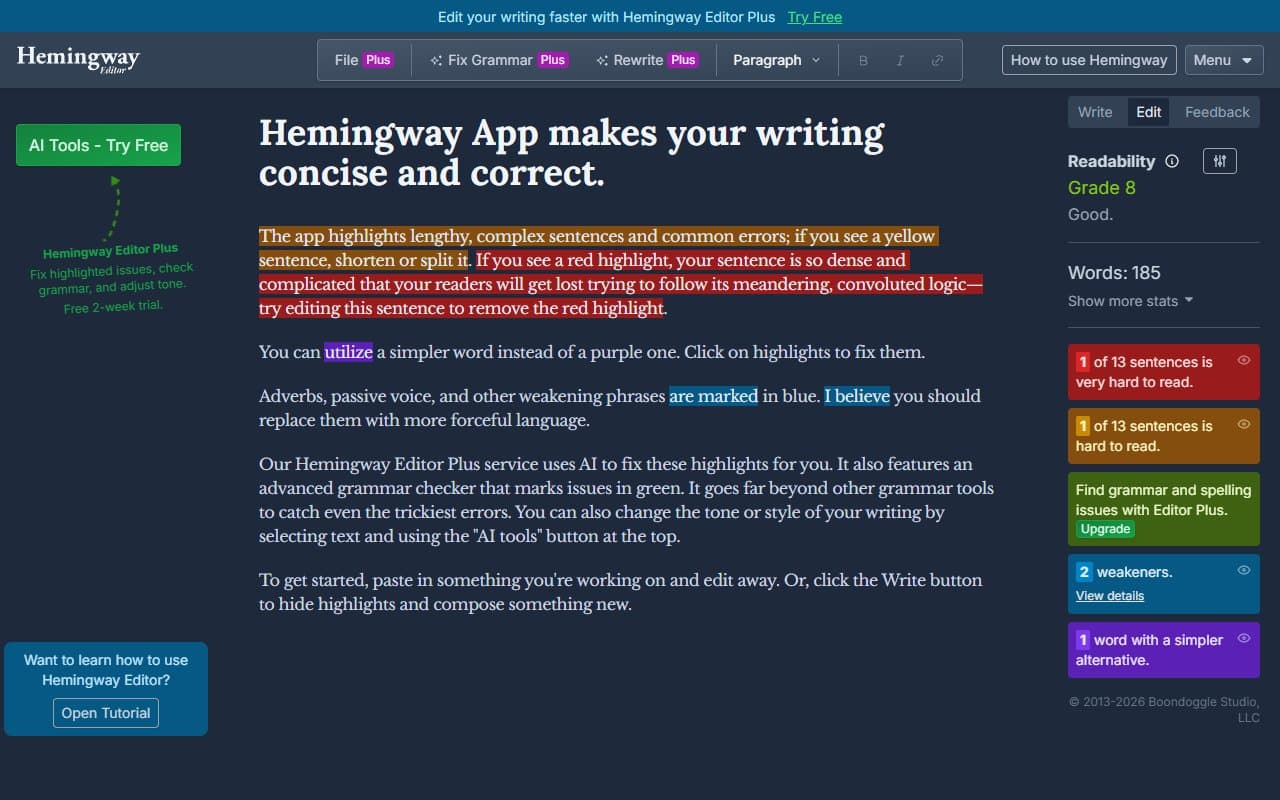
You write something. You think it's clear. Then a client emails back asking what you actually meant. Your open rates tank. Your website copy sits there, technically correct, earning nothing. The problem isn't your ideas — it's sentences that bury them. Hemingway Editor fixes exactly that.
Who Should Use Hemingway Editor
Solopreneurs writing website copy, newsletters, or blog posts need this. Most people write how they think — long sentences full of qualifiers. Hemingway makes that pattern impossible to ignore. A freelance consultant publishing twice weekly cut her editing time by 40 minutes per post. That's real time back.
Small e-commerce teams find it useful for product descriptions and social copy — anywhere clarity drives conversions. Non-native English writers especially benefit. The readability scoring gives you objective benchmarks rather than vague "it sounds off" feedback.
Hemingway is not a team tool. Running a five-person content agency where writers need version history, comments, or AI drafting? You'll hit limits within a week. It was built for individual discipline, not collaborative workflow.
What It Actually Does
Paste your writing in. The editor colour-codes problems. Yellow sentences are too long. Red ones are nearly unreadable. Purple highlights words with simpler alternatives. Blue marks adverbs. Green flags passive voice.
No AI rewriting. No tone suggestions. No content scoring against competitors. Just a mirror. Your Grade 9 prose turns orange. Your 43-word sentence glows red. You fix it. The desktop version works offline and saves files, but the core experience matches the free browser version.
Simple to the point of seeming basic. That simplicity is the point.
Pricing
Free (browser-based): Full editing experience online. Every colour-coded highlight, readability grade, word count. No account required. For small business owners editing occasional content, this works. The free version isn't crippled.
Desktop App — $19.99 one-time: Pay once, own it. Work offline, save files, switch between light and dark mode. No subscription. For anyone writing multiple times weekly, $19.99 pays for itself in saved-file workflow alone. Buy this tier.
No team plan, no enterprise tier, no monthly subscription. Clean pricing for a focused tool.
What Works Well
The readability grade hits hard. Targeting Grade 8 for business content is standard advice — Hemingway makes hitting that target measurable. When your homepage scores Grade 12, you understand why your bounce rate embarrasses you.
Passive voice detection changes habits. Most writers use passive voice unconsciously. Seeing it highlighted repeatedly creates feedback loops that style guides can't match. After a month of regular use, you catch it before typing it.
One-time desktop pricing. In a market of monthly subscriptions that drain accounts quietly, paying $19.99 once feels almost nostalgic. No billing surprises. No upgrade prompts.
What Doesn't Work
It flags but never fixes. Hemingway tells you sentences are too long. It doesn't tell you how to shorten them. Experienced writers know what to cut. Beginners get shown a red sentence with no repair guidance — like getting a broken engine light and no mechanic.
Legal and technical writing breaks it. Business requiring precise, qualified language — contracts, compliance documents, technical specs — will see half their content flagged as unreadable. The tool can't distinguish intentional complexity from bad writing. Running your terms and conditions through it wastes time.
How It Compares
Grammarly: Checks grammar, tone, and spelling at levels Hemingway ignores. If correctness matters more than clarity, Grammarly wins. Most serious business writers use both — Grammarly first, Hemingway second.
ProWritingAid: More features, more complexity, higher monthly cost. Fiction writers or long-form specialists might prefer it. For small business owners writing 500-word blog posts, ProWritingAid is overkill.
ChatGPT: Not comparable — generates text versus editing yours. Different jobs.
The Verdict
Write your own content — blog posts, newsletters, web copy, proposals — and wonder why it doesn't land? Hemingway Editor is a $19.99 answer worth having. The discipline it builds exceeds the price tag. Need AI drafting, team collaboration, or grammar correction? Go to Grammarly or a proper content suite. Hemingway does one job — making writing leaner and clearer — better than anything at this price. Clear writing makes you more money, and this is the fastest way to get there.
Common Questions
Is the free version good enough?
For occasional use — monthly newsletters or reviewing your about page — yes. The free browser version matches the paid app's features. Buy desktop only if you write multiple times weekly and want native file saving.
Does it work for non-native English writers?
Yes, because it doesn't correct grammar — it highlights structural problems like sentence length and passive voice. Colour-coded feedback beats grammar rulebooks.
Can it replace Grammarly?
No. Grammarly catches spelling, grammar, and punctuation. Hemingway catches readability problems. Different problems, different tools. Using both takes three extra minutes per piece and pays off.
Works for professional business documents?
For proposals, emails, marketing copy — yes. For legal documents, technical manuals, or compliance materials — no. The tool penalises complexity without context, so precise language scores poorly even when correct.